Account Status & Access
Access to eVAL turns on in stages as your district completes setup — it isn't all-or-nothing. If you can't see something yet, it usually means a setup step is still pending, not that anything is broken.
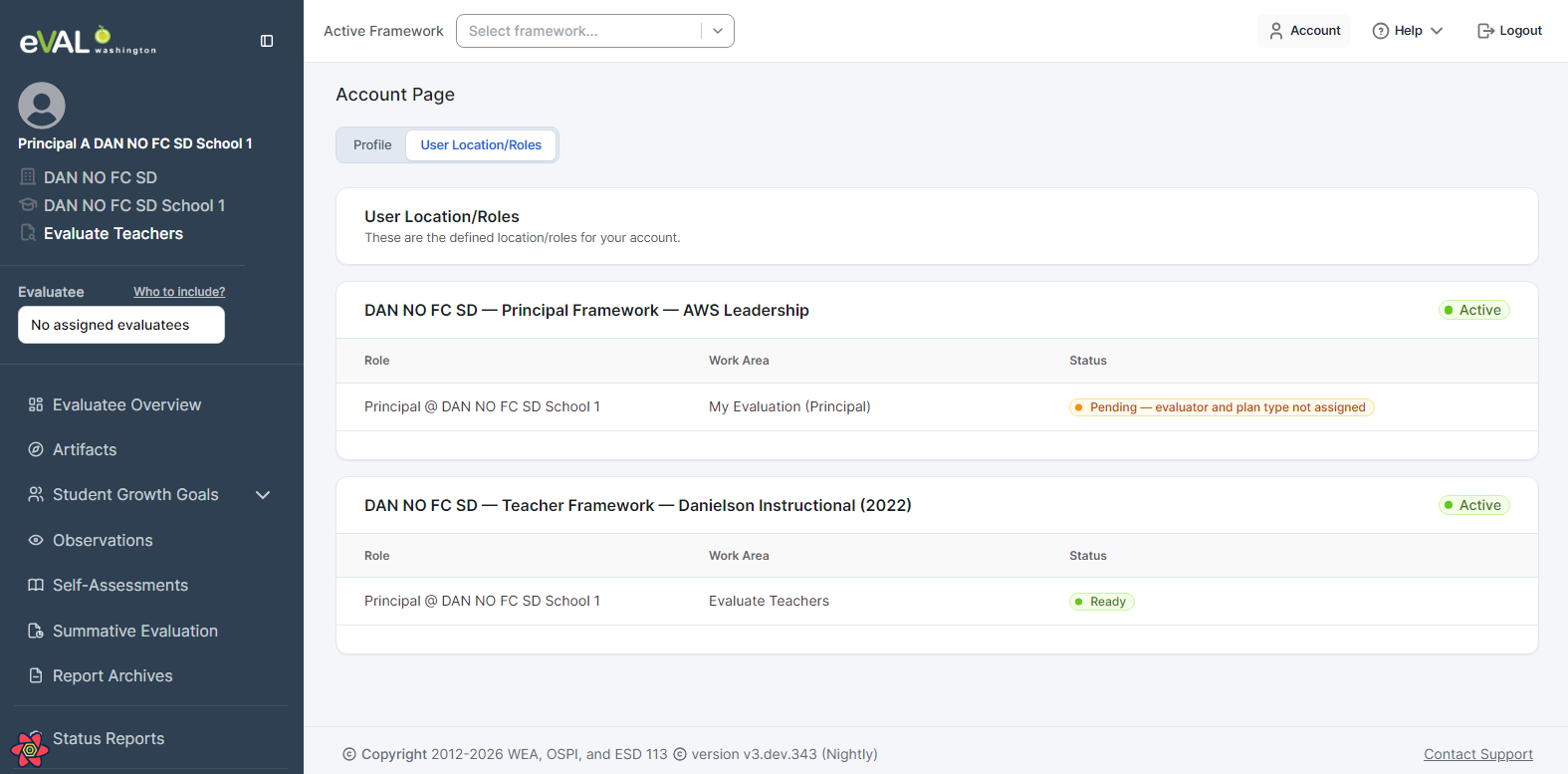
Your Account → User Location/Roles page tells you exactly where you stand: which of your work areas are ready to use, and which are still waiting on a setup step (and which one).
:::info This Is the Page to Check First Before contacting support, open Account → User Location/Roles. It lists each of your roles and locations with a status — Ready or Pending — and, when pending, what still needs to happen. :::
Access Builds Up in Stages
Three setup steps gate access, completed by your administrators in order:
| Stage | Who Completes It | Until It's Done… |
|---|---|---|
| 1. Framework selection (per evaluation type) | District Admin | Users with that evaluation type can't access it yet |
| 2. Evaluator assignment | District Admin — or a School Admin/principal if the district has delegated assignment setup to schools | The evaluatee can't open their evaluation, and the assigned evaluator won't see it either, until evaluation setup is complete |
| 3. Plan type (Comprehensive/Focused) | District Admin — or a School Admin/principal if delegated to schools | Same gate as above — neither the evaluatee nor the evaluator can open the evaluation until both assignment and plan type are set |
District Admins always have access. Everyone else gains access as the stages above complete for their roles.
:::tip Evaluators: your caseload fills in gradually Stages 2 and 3 are per evaluatee, not per evaluator. An evaluatee appears in your list once they have both an evaluator and a plan type — so it's normal to see some of your evaluatees and not others while your administrator works through the roster. You can start on anyone who's already there; you don't have to wait for the rest. :::
Partial Access Is Normal
Framework selection happens per evaluation type (Teacher, Principal), and many people hold more than one role — so it's common to have access to part of eVAL while the rest is still pending.
Example — a principal:
A principal wears two hats, and each depends on a different framework:
- As an evaluator of teachers, they need the Teacher framework. Once the District Admin loads it, the principal can start setting up and conducting teacher evaluations right away.
- As an evaluatee (their own evaluation), they need the Principal framework loaded, plus an assigned evaluator (a District Principal Evaluator) and a plan type.
So if only the Teacher framework is loaded, the principal can already work on their teachers' evaluations but won't see their own evaluation yet — that's expected, not an error. The User Location/Roles page shows the teacher-evaluation work area as Ready and the principal's own-evaluation work area as Pending, with the reason.
Messages You Might See
When a stage is still pending, eVAL shows a specific message instead of opening the work area:
"Framework Setup Incomplete"
Your District Admin hasn't selected the framework for that evaluation type yet.
Your eVAL district admin has not yet completed the framework selection process for performing evaluations in eVAL. Once this is complete, the individual evaluation setup of assigning evaluators and plan types can begin.
Who sees it: School Admins, evaluators, and evaluatees (everyone except District Admins), for any evaluation type whose framework isn't loaded.
Resolution: Ask your District Admin to complete framework selection in Evaluation Setup → Framework Setup.
"Evaluation Setup Incomplete"
The framework is loaded, but your own evaluation isn't fully configured yet.
Before you can access eVAL, your evaluation must be fully configured. The following items need to be completed:
- You do not have an evaluator assigned
- You do not have a plan type assigned
Who sees it: Evaluatees only (teachers and principals being evaluated).
Resolution: Ask your administrator to finish your evaluator assignment and plan type. You may see one or both items listed.
What "Ready" Looks Like
Once the relevant stages are complete, the work area changes from Pending to Ready and its activities open up. A principal whose teacher framework is loaded — but whose own evaluation is still being set up — sees a mix of both on the User Location/Roles page. You can work in any area that's Ready without waiting on the others — so that principal can go ahead and evaluate their teachers (as long as the teacher framework is loaded and those evaluations are set up) even while their own evaluation is still Pending.
Quick Reference
| User Type | What They Need | If Missing |
|---|---|---|
| District Admin | Nothing | Always has access |
| School Admin | Framework for the relevant evaluation type | "Framework Setup Incomplete" |
| Evaluator | Framework for the type they evaluate | "Framework Setup Incomplete" |
| Evaluatee | Framework + evaluator + plan type | "Framework Setup Incomplete" or "Evaluation Setup Incomplete" |
:::tip Recently Added or Changed Staff If you're brand new or just changed schools/roles, your access depends on your EDS record flowing into eVAL — which happens on a nightly sync and on your first sign-in. If you're missing entirely or in the wrong school, the fix is in EDS, with your District Security Manager. :::
Related Topics
- Roles in eVAL — what each role can do
- Navigating Work Areas — how eVAL organizes your roles and locations
- Start of Year Setup — the administrator's side of completing these stages